Last Login and Logout (View Based)

Understanding user behavior and maintaining robust security requires more than just basic analytics. Implementing a reliable system to monitor user sessions is essential for modern business applications and data-driven decision-making.
Key Takeaways
- Being able to track login and logout times allows organizations to analyze user engagement and monitor employee performance accurately.
- A dedicated login and logout monitoring system can be seamlessly integrated into low-code platforms like Knack using custom JavaScript.
- Creating specific database objects and views ensures that every session timestamp is recorded without disrupting the user experience.
- Leveraging custom code within a low-code environment saves significant development time and budget while delivering enterprise-grade tracking capabilities.
Why You Need a Reliable Login and Logout Monitoring System
Being able to track login and logout times allows businesses to leverage data more efficiently. Whether you’re monitoring employee performance or accruing customer data to improve sales strategies, more data allows you to make informed business decisions based on concrete facts. If your current setup lacks these insights, it might be time for legacy system modernization.
This tracking feature is usually implemented to keep track of the users who use the application and the period of time for which a session lasts.
Knack applications allow you to implement authentication forms simply and quickly. However, when establishing a strict control or audit on the logins or logouts that are constantly running within the application, you must use JavaScript to capture those precise moments.
How to Track Login and Logout Times in Knack
Below we list a series of steps that will serve as a guide for the implementation of these logs so you can effectively track login and logout times and improve your overall workflow automation:
1. Create a New Object in the Database
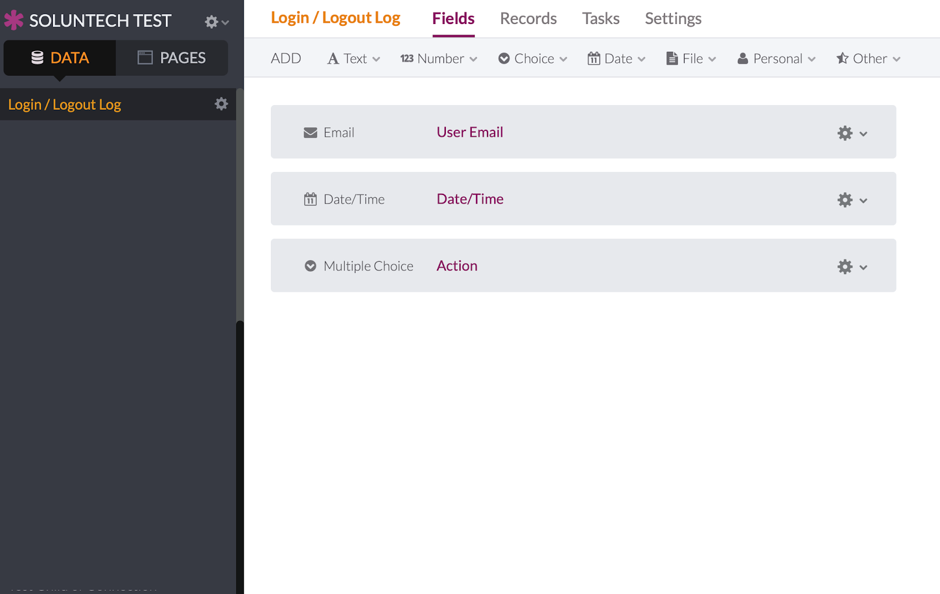
Although the object can have any number of fields, it is highly recommended that it have at least three core fields: Email, Date / Time, and Action (Multiple Choice = Login or Logout).
2. Create a New Page Without Login Requirements
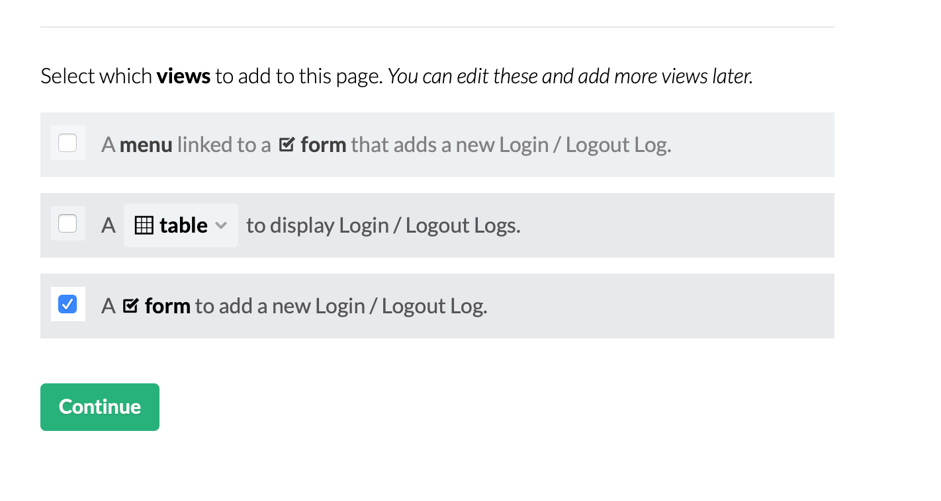
Create a new page with the option of not requiring a login. In the object selection, choose the one you created in step 1, and for the views that the new page should have, select the form option.


3. Hide the New Page from the Menu
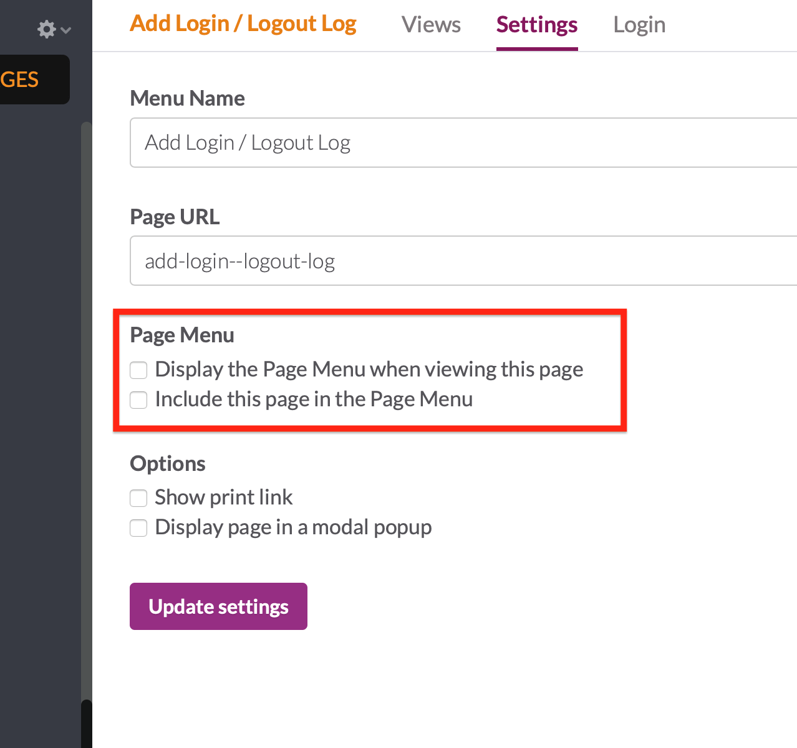
Once the new page is created, it must be indicated that it’s not visible in the application menu. This is done securely in the settings tab.
4. Add the Custom JavaScript Code
To finalize your login and logout software functionality, add the following lines of code within the API & Code section:
var LOGIN_PAGE = false;
var LOGIN = false;
// Helper functions
function createRecordLog(action) { // All view-based requests are accessed through a scene key and view key and // use a URL in the following format: // https://api.knack.com/v1/pages/scene_key/views/view_key/records var user = Knack.session.user; return $.ajax({ type: 'POST', headers: { // Set your Knack application Id 'X-Knack-Application-Id': 'XXXXXXXXXXXXXXXXXXXXXXXXX', 'Authorization': Knack.getUserToken() }, // Change scene_XXX and view_XXX for the scene and view IDs that were created url: 'https://api.knack.com/v1/pages/scene_XXX/views/view_XXX/records', data: { field_242: { // Change field_XXX for Email field ID email: user.email }, field_389: action // Change field_YYY for Action field ID } });
}
// Knack events
// Login actions
$(document).on('knack-scene-render.any', function (event, scene) { LOGIN_PAGE = $('.kn-login').length == 1 ? true : false; if (LOGIN_PAGE) { LOGIN = false; $('input[type="submit"]').click(function (e) { e.preventDefault(); LOGIN = true; $('form').submit(); }); } else { if (LOGIN) { LOGIN = false; createRecordLog('Login'); } }
});
// Logout actions
$(document).on('knack-scene-render.any', function (event, scene) { // Check is already authenticated if (!Knack.session.user) { return; } $('.kn-log-out').on('click', function () { createRecordLog('Logout'); });
});
Low Code Development Saves Time and Money
We hope this guide on how to track login and logout times has been insightful! Here at Soluntech, we employ Knack and other low code development solutions to maximize the reach of both your budget and our time. Rest assured we never compromise the integrity of the project, but we will use existing tools whenever possible. This allows us to work 10x faster than other developers while also saving your organization a significant amount of money. For more UI enhancements, you can also explore how to upgrade your Knack interface.
 Start Your Custom Software Project Today
Our goal is to form meaningful, long-term relationships with our clients. That starts with a complimentary pre-consultation that allows both parties to ensure that we’re an ideal fit. Whether you need help implementing features to track login and logout times or brand new, custom software development built from scratch, you can depend on us to move forward with urgency and unparalleled skill. We encourage you to view our case studies and our blog to get a feel for our experience. Contact us now so we can turn your vision into a reality.
Questions this article raises.
What is a login and logout monitoring system?+
A login and logout monitoring system is a tracking mechanism that records the exact timestamps when users access or leave a digital application. This data helps businesses monitor session durations, audit platform security, and analyze overall user engagement.
Why is it important to track login and logout times?+
Tracking these metrics allows companies to verify employee productivity, secure sensitive data by identifying unusual access patterns, and gather actionable customer insights. Having access to this concrete data is essential for making informed business and operational decisions.
Can I build login and logout software using low-code platforms?+
Yes. Platforms like Knack make it very simple to deploy authentication forms. By adding a few lines of custom JavaScript and routing it through an API, you can create powerful login and logout software without having to build the entire backend architecture from scratch.
Soluntech Team
AI-Native Engineering Firm
Soluntech's team writes about software, AI systems, validation, and operational technology from the perspective of disciplined engineering and long-term system ownership.
Continue with related insights.
Explore more thinking connected to this topic, from software decisions to AI systems and operational execution.

Are AI-Built Apps Scalable? The Risks and Realities of Vibe Coding Platforms Like Lovable
Fast to build doesn’t always mean ready to scale.
Soluntech Team
AI-Native Engineering Firm

The Hidden Cost of Early Automation: Avoiding Rigid AI
The Hidden Cost of Early Automation: Avoiding Rigid AI
Soluntech Team
AI-Native Engineering Firm

5 web 3.0 examples: The future of the internet is already here
Foto de Nathan Duck en Unsplash
Soluntech Team
AI-Native Engineering Firm